You can control various settings related to the Memento storefront. Go to Customization on the left-side menu. 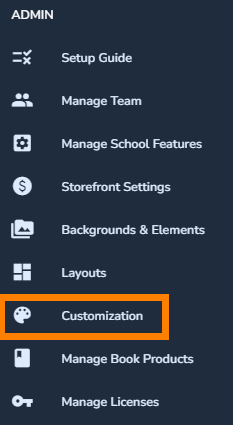
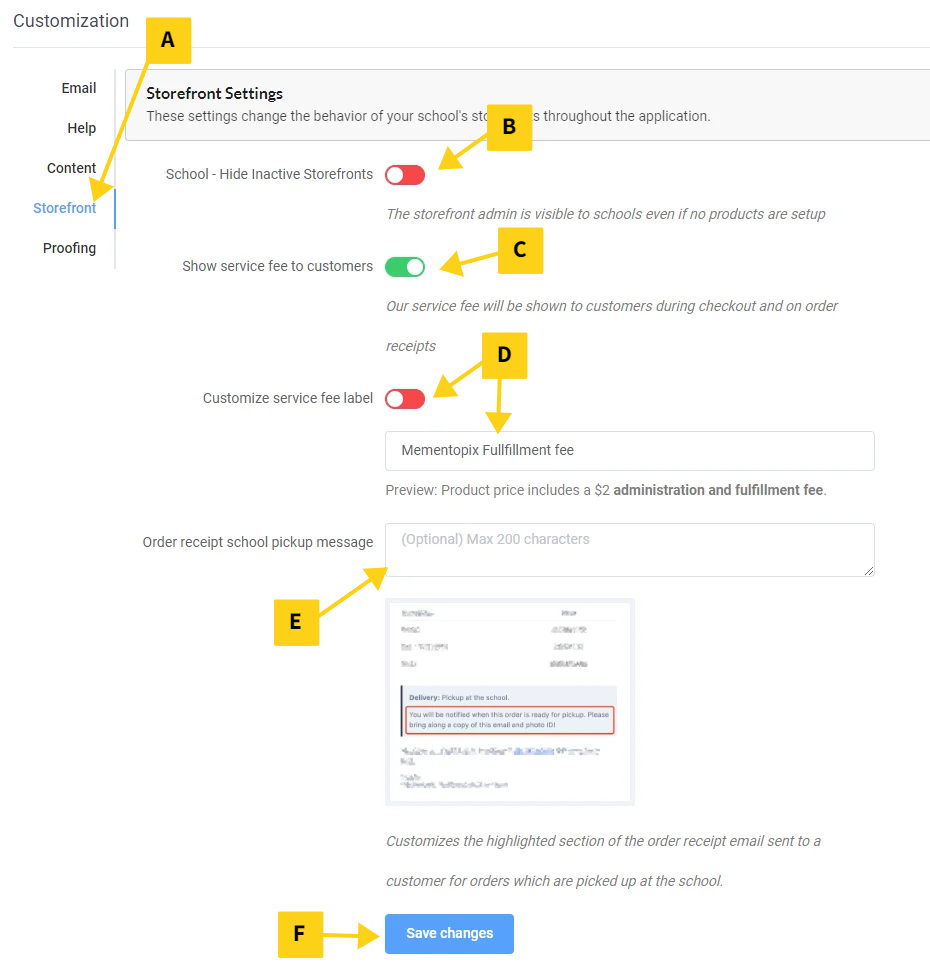
Click Storefront to access the different settings (A). Choose among the following options:
- Hide inactive storefronts (B): If your school does not have an active storefront or you are using your own custom solution outside of Memento, turn this toggle on. They will not see their storefront option in their Memento app.
- Display service fee to customers (C): If you wish to show store admin fees directly to your customers, turn this toggle on. The service fee will display on the order form and receipt as a separate line item. Otherwise, build the service fees into your book pricing.
- Customize the service fee label (D): If you display the service fee to your customers, you can provide your own description of the fee.
- Order receipt pickup message (E): Let your customers know when and where they can expect their book to be delivered.
Save your changes (F) when your storefront customization is complete.
Was this article helpful?
That’s Great!
Thank you for your feedback
Sorry! We couldn't be helpful
Thank you for your feedback
Feedback sent
We appreciate your effort and will try to fix the article