Encountering printing anomalies, such as unusual artifacts, is common when printing PDFs containing transparent images on certain printers. Several tools are available to address these occasional but specific challenges. For instance, Nitro PDF offers a feature to flatten PDFs, effectively resolving these printing issues.
Memento includes a Flatten PDF feature to combat these problems. Once enabled, you can choose to download a standard layered PDF (ideal for image effect processing to enhance print quality) or a flattened version for troubleshooting specific printing issues with a particular yearbook. The flattened PDFs have converted the page to a 300 dpi JPG image, which is designed to eliminate any potential printing problems with layering.
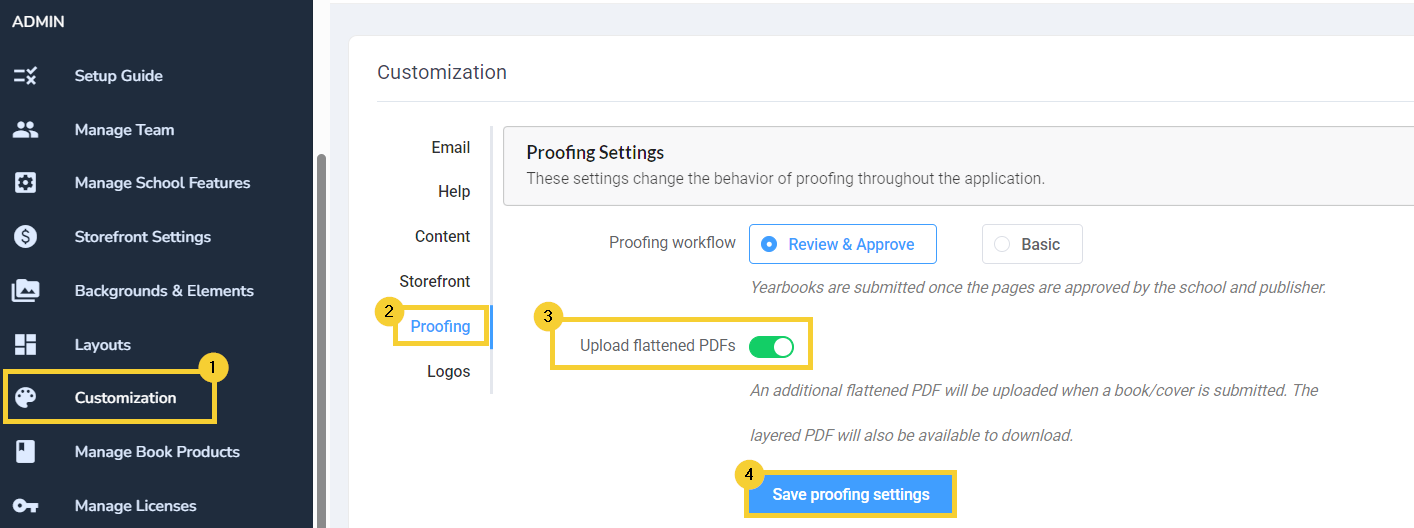
- Click on the Customization tab.
- Select Proofing
- Toggle Upload Flattened PDFs on.
- Save proofing settings
Once this feature is turned on, choose to download a layered or flattened pdf of your books under the Proofing tab.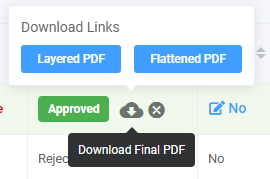
Was this article helpful?
That’s Great!
Thank you for your feedback
Sorry! We couldn't be helpful
Thank you for your feedback
Feedback sent
We appreciate your effort and will try to fix the article